Paperless Home: Receipts: 3. Digitize

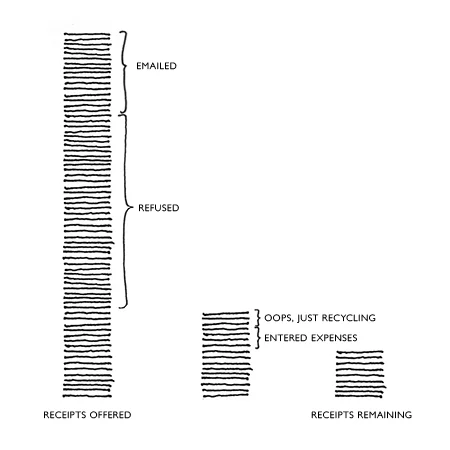
I’m working on a series to chronicle how I achieve a Paperless Home and the first project is Receipts, woohoo! Most of the receipts I’m offered are either refused or already digital. With the dozen or so per month that actually make it home with me, if I don’t record the expense and ditch the receipt...

3. I save images of them digitally: If I have deemed a paper receipt necessary to keep, I decide if I can scan it and save it digitally. Good news, the future is here! Technology has made it possible to scan, file and store everything in the cloud. They’re searchable, clutter-free and even the IRS accepts them.
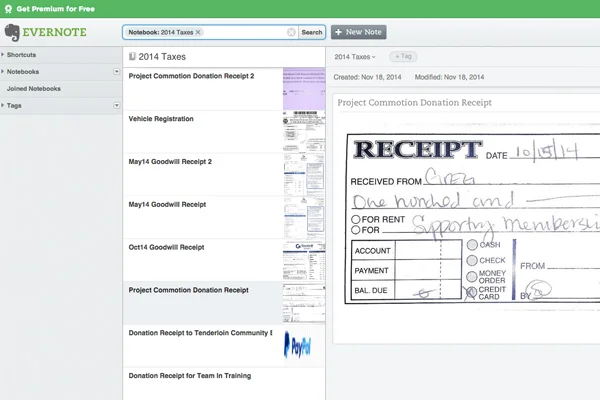
An Evernote notebook for my 2014 Taxes

An Evernote notebook for my 2014 Taxes

I add business and tax-related receipts to an Evernote notebook titled “2014 Business Receipts” or “2014 Taxes”. Come tax time, I just export that notebook and send it to the accountant along with my yearly account statements. I actually photograph my receipts through the Evernote app on my phone because I got rid of our scanner a few years ago :) Dropbox is another great option for storing files and digital receipts.

Digital receipts stored in Dropbox

Digital receipts stored in Dropbox

I sometimes like to have digital receipts for large purchases where insurance or warranty coverage feels important. I have about 10 of these total, but to be honest I’ve never submitted a warranty issue and needed the original receipt.
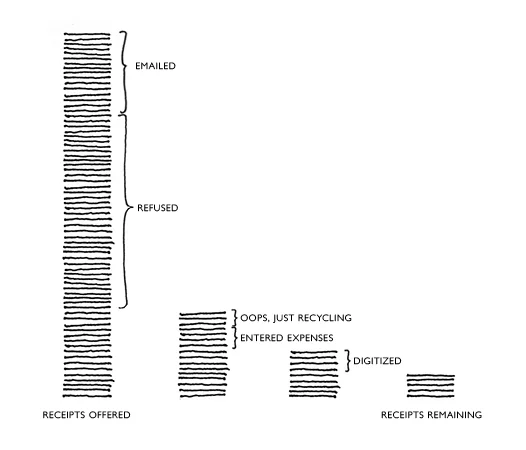
Photographing and storing receipts digitally has become the easiest way for me to track and recall business or tax receipts. It also makes for a more paperless home! Next, I’ll discuss the few physical paper receipts I keep...

+ Remember, this is what works best for me and has helped our home stay paperless. You might need a different system, especially for taxes or business receipts, so please ask your accountant if you're unsure!

Paperless Home: Receipts: 2. Expenses

I’m working on a series to chronicle how I achieve a Paperless Home and the first project is Receipts, exciting, I know! Most of the receipts I’m offered are either refused or already digital. With the dozen or so per month that actually make it home with me, I do one of three things: record the expense only and ditch the receipt, add it to Evernote and ditch the paper, or keep the receipt temporarily. I’m discussing the first option in this post.

So, the second step to a receipt-less home is:
2. I track expenses digitally: I keep a few receipts when I get home so I can reconcile them with my budget. I use Mint.com for this so once I can confirm the expense or categorization, I can ditch the receipt.

Mint.com screenshot (not mine ;)

Mint.com screenshot (not mine ;)

When I first started considering a paperless home, I noticed that I was holding onto a number of receipts for medical bills and large home purchases. I felt like I needed some record of the expenses but not necessarily the paper receipts. Instead of keeping them, I set up a system to just track the payment and other pertinent information in a spreadsheet in Google Docs.

My Medical spreadsheet allows me to track costs as well as appointments and lab work results. I don’t keep medical receipts. I’ve spent a lot on these bills over the last few years and still haven’t had enough to itemize. If I did want to keep them, I would digitize the bills (see the next step!)

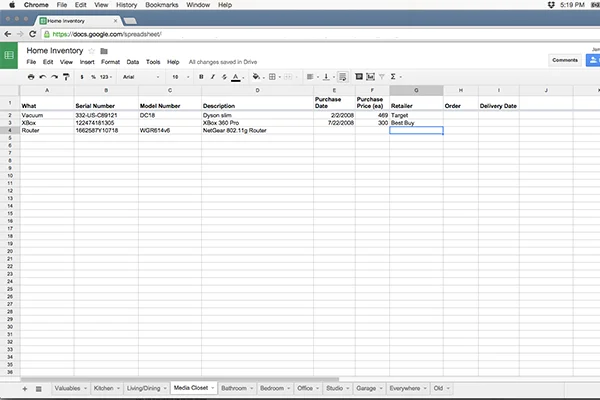
A tab from my Home Inventory in Google Docs

A tab from my Home Inventory in Google Docs

My Home Inventory spreadsheet allows me to track my larger home purchases and their values which I like to have for insurance purposes. I’ll list the item, supplier, cost and date purchased. This info is also helpful if I go to sell something on Craigslist in the future. (Honestly, this spreadsheet is rarely used.)

Tracking expenses in a spreadsheet is an easy way to record purchases without having to hold on to receipts. They are also much easier to find and search! In the next post, I’ll discuss saving the full receipt digitally for business or tax purposes.

+ Remember, this is what works best for me and has helped our home stay paperless. You might need a different system, especially for taxes or business receipts, so please ask your accountant if you're unsure!